Disclosure: This article contains affiliate links. If you buy through them, SolarEvaluator earns a small commission at no extra cost to you. We only recommend equipment we would size into our own systems.
Reading a LiFePO4 battery’s charge level from its voltage is like reading a fuel tank from the smell of the cap. Lithium’s discharge curve is famously flat — the battery sits near 13.2 V from 80 percent down to 20 percent, then falls off a cliff. Every “my battery died with no warning” story starts with someone trusting a voltage readout. A shunt-based monitor fixes this by counting every amp-hour that flows in and out, giving you a true state-of-charge percentage. These are the three worth buying.
Quick Picks
| Monitor | Type | Best For |
|---|---|---|
| Victron SmartShunt 500A (top pick) | Bluetooth shunt, no display | Anyone with a smartphone |
| Victron BMV-712 | Shunt + panel display | Glance-at-the-wall monitoring |
| Renogy 500A Monitor (budget) | Shunt + wired display | Tight budgets |
1. Victron SmartShunt 500A — Best Overall
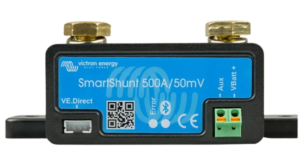
The SmartShunt is the monitor I fit by default: a 500A shunt that bolts into your battery’s negative cable and streams everything to the VictronConnect app over Bluetooth — state of charge to a tenth of a percent, live watts in or out, time-remaining at the current draw, and lifetime statistics like deepest discharge and total energy through the bank. There is no display to mount because your phone is the display, which also makes it the cleanest install of the three. Historical data has real diagnostic value: when a battery starts aging, the synchronization drift shows it months before failure.
Pros: Superb app, one-cable install, per-chemistry presets including LiFePO4, integrates with Victron controllers for a single dashboard.
Cons: No physical display; Bluetooth range is one wall, maybe two.
Check Current Price — Victron SmartShunt →
2. Victron BMV-712 — Best with Display
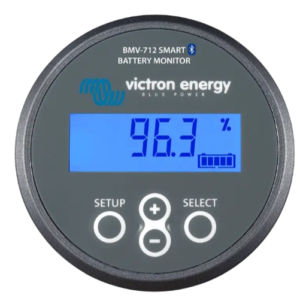
Electrically the BMV-712 is the same instrument as the SmartShunt — same 500A shunt, same accuracy, same Bluetooth and app — plus a round panel display you flush-mount wherever you glance: the hallway, the RV wall, above the inverter. If other household members need to see battery percentage without opening an app, this is the difference that justifies the extra cost. It also has a programmable relay output that can trigger a low-battery alarm or start a generator.
Pros: Everything the SmartShunt does plus an always-on display and relay output.
Cons: Costs more; needs a 55 mm hole and a display cable run.
Check Current Price — Victron BMV-712 →
3. Renogy 500A Battery Monitor — Budget Pick
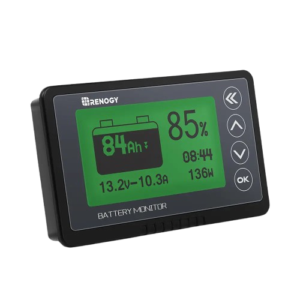
Renogy’s shunt monitor delivers the core function — true coulomb-counting state of charge with a clear wired display — at roughly half the Victron’s price. You give up the app ecosystem, the historical statistics and some refinement in the auto-synchronization logic, but the number on the screen is the real number, which puts it a class above every voltage-guessing meter at any price. For a straightforward 12V or 24V bank where you just need honest percentage and amps, it does the job.
Pros: Real shunt accuracy at a budget price, backlit display, simple setup.
Cons: No Bluetooth or logging; display cable is fiddly to route; fewer chemistry presets.
Check Current Price — Renogy 500A Monitor →
Setup: The Three Numbers That Matter
Whichever monitor you choose, accuracy depends on three settings. Battery capacity in amp-hours must match your bank exactly — a 2x 100Ah parallel bank is 200Ah. Charge efficiency should be set around 99 percent for LiFePO4 and 85 to 90 percent for lead-acid; getting this wrong makes the percentage drift optimistic over weeks. And the charged-voltage threshold tells the monitor when to auto-sync back to 100 percent — set it just below your charger’s absorption voltage so every full charge re-anchors the count. Five minutes in the settings menu is the difference between a monitor you trust and one you slowly stop believing.
Why a Shunt Beats Every Voltage Meter
A shunt is a precision resistor that sits in the negative cable; the monitor measures the microvolt drop across it and integrates current over time — amp-hours out, amp-hours in, corrected for charge efficiency. That is why it can say “62 percent, 14 hours remaining at this load” while a voltmeter can only say “13.2 V, good luck.” The practical payoff: you stop over-discharging (the thing that actually kills LiFePO4 banks early) and you finally know whether your solar covered today’s usage. Pair the reading with our Battery Backup Calculator to sanity-check how long your bank should last at any load, and with the Solar System Calculator when the data tells you it is time to grow the bank.
Installation is the same for all three: the shunt goes in the main negative cable between battery and everything else — every load and every charger returns through it, or the count is wrong. It is a 20-minute job with one cable lug to crimp.