Disclosure: This article contains affiliate links. If you buy through them, SolarEvaluator earns a small commission at no extra cost to you. We only recommend equipment we would size into our own systems.
Every wattage table on the internet — including our own Appliance Wattage Database — gives you typical values. Your specific ten-year-old refrigerator, your particular window AC with tired bearings, your gaming PC with its exact GPU: those are numbers only a meter can tell you. A $25 watt meter is the highest-value purchase in all of solar planning, because every downstream decision — battery size, inverter rating, panel count — inherits its accuracy. These are the three worth owning.
Quick Picks
| Meter | Type | Best For |
|---|---|---|
| P3 Kill A Watt P4400 (classic) | Plug-in display meter | Spot measurements, dead-simple use |
| Poniie PN2000 (top pick) | Plug-in display meter | Higher accuracy, bigger loads |
| Kasa EP25 Smart Plug | Wi-Fi energy monitoring plug | Long-term logging from your phone |
1. P3 Kill A Watt P4400 — The Classic
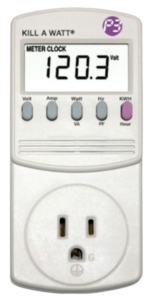
The Kill A Watt has been the default answer for twenty years because it does exactly one job with zero setup: plug it into the wall, plug the appliance into it, read watts. Buttons cycle through volts, amps, watts, power factor and — the important one — cumulative kWh over time, which is how you capture a refrigerator’s true daily consumption including all its compressor cycling. Rated to 1,875 W, it covers everything short of heaters and kettles at full tilt.
Pros: Utterly simple, accurate enough for sizing decisions, the cumulative kWh mode is the killer feature.
Cons: Display is not backlit and sits at outlet height (bring your phone camera); no logging or export.
Check Current Price — Kill A Watt P4400 →
2. Poniie PN2000 — Best Overall
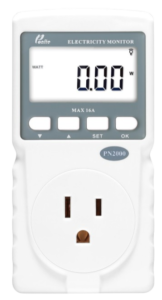
The PN2000 is what the Kill A Watt would be if it were designed this decade: a large backlit display, finer resolution on low-draw devices (it resolves the 1-to-2 W standby loads that older meters round to zero), and a 16A rating that handles bigger appliances without worry. For measuring the phantom loads that quietly eat your battery overnight — routers, standby TVs, chargers — the low-end resolution is the difference between data and noise. This is the one I reach for first.
Pros: Backlit display, excellent low-wattage resolution, higher current rating, clear manual.
Cons: Slightly costlier than the classic; still no data export.
Check Current Price — Poniie PN2000 →
3. Kasa EP25 Smart Plug — Best for Logging
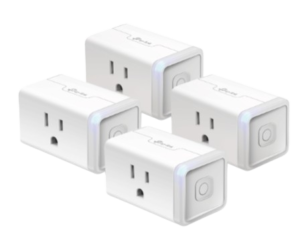
A display meter answers “what is it drawing now?” A monitoring smart plug answers the better question: “what did it use this week?” The Kasa EP25 logs energy continuously to its app, graphing daily and monthly kWh per device — leave one on the fridge for a week and you have the real number our Battery Backup Calculator wants, seasonal variation included. It is also a normal smart plug, so the standby loads you discover can be scheduled off automatically, which is the cheapest energy saving you will ever implement.
Pros: Continuous logging with history graphs, remote on/off doubles as a phantom-load killer, cheap enough to leave on several appliances.
Cons: Needs Wi-Fi and an app; 15A limit; measures at the plug only (no hardwired loads).
Check Current Price — Kasa EP25 →
What About Hardwired Loads?
Plug-in meters only measure what plugs in. Water pumps, well pumps, hardwired ACs and geysers need a clamp meter — a handheld tool that reads current through a wire without touching it. A basic true-RMS clamp meter measures the amps, you multiply by your voltage, and you have watts; the better ones display power directly and capture inrush current, which is exactly the surge number our calculators ask about for motor loads. If your backup plans include a pump or a split AC, add a clamp meter to the shopping list alongside the plug-in unit — between the two you can measure every load in the house.
How to Measure Like You Mean It
Three rules turn a cheap meter into professional data. First, measure cycling appliances (refrigerators, freezers, AC) over at least 24 hours using the cumulative kWh mode — an instantaneous reading catches either the compressor running or resting and both numbers are wrong. Second, capture worst case: measure the AC on a hot afternoon and the fridge after grocery day, because backup systems fail on the worst day, not the average one. Third, hunt standby loads by measuring everything that stays plugged in overnight; a house with 40 W of phantom draw loses nearly 1 kWh per day, which is a meaningful slice of any battery bank.
Then put the numbers to work: replace our database defaults with your measured values in the Solar System Calculator, and your panel, battery and inverter sizing stops being an estimate. Measured inputs are the difference between a system that looks right on paper and one that actually carries your house through an outage — see our guides to refrigerator wattage and AC wattage for what typical values look like before you measure.